Lead source tracking for WordPress.
WordPress lead source tracking, done once for the whole site. The official WordPress.org plugin plus the hosted script, from the company that only does this.


Pick the WordPress setup that fits.
Lead Source runs on WordPress two ways. Install the free official plugin and keep every lead inside your own WordPress admin, or drop in one hosted script and send leads to your Lead Source dashboard. Same capture - the difference is where your data lives.
The official plugin
- Captures the source on every form, stored in your own WordPress admin
- Two-click install from the directory, no account
- Works across every form plugin you already run
The one-line script
- One JavaScript line in your <head>, no plugin
- Leads land in your Lead Source dashboard, independent of WordPress
- Survives a rebuild or migration
One dashboard. Every answer.
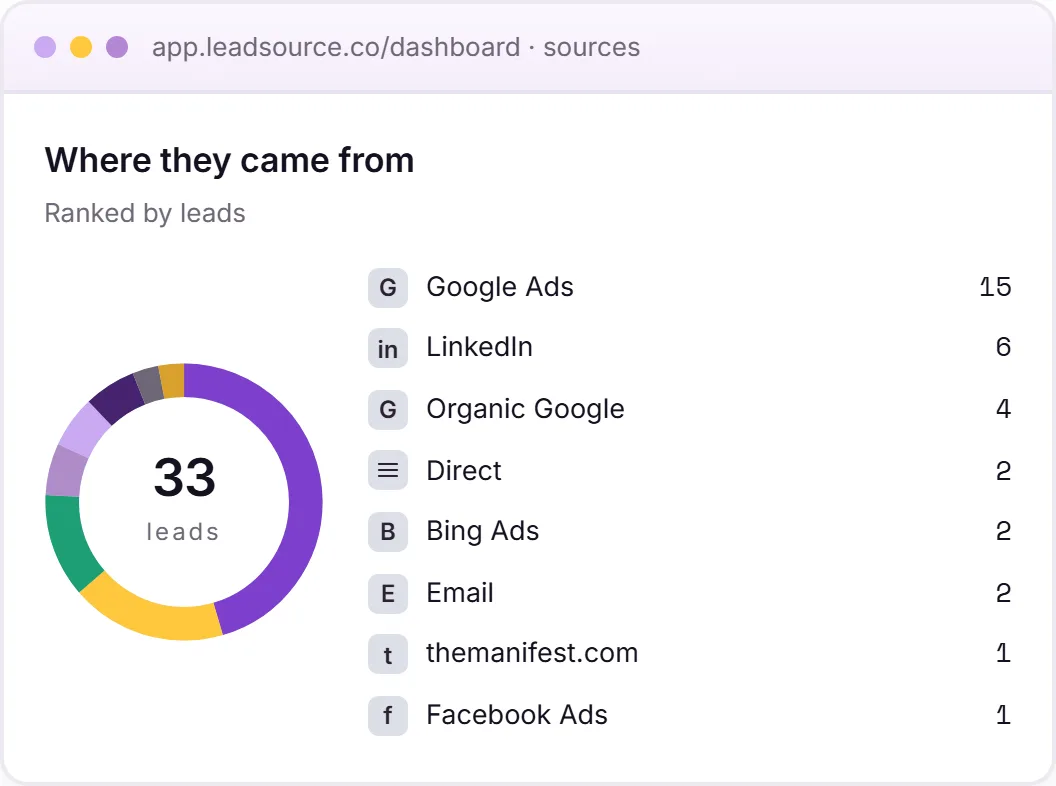
Every WordPress form lead, ranked by the channel that actually produced it. Which campaigns pay, and which don't, then the full journey behind each enquiry.
- A ranked source breakdown across every channel
- The landing page and full page journey on each lead
- One view, independent of your CRM
Works with every major WordPress form plugin
Most WordPress sites have more than one form plugin.
WordPress sites accumulate form plugins over time. The quote form is Gravity Forms, the newsletter widget is Elementor, the contact page is Contact Form 7. Each plugin has its own approach to hidden fields, its own submission events, and its own quirks.
Forms. The part WordPress nails
- Visual form builders with every field type
- Email notifications, auto-replies, CC, BCC
- Entry storage, exports, integrations
- Spam filters, reCAPTCHA, validation
- Conditional logic, multi-step, payments
Where each lead actually came from
- The campaign that drove the click
- The landing page they entered on
- Pages they read before submitting
- A consistent record across every form plugin
- Source data that survives plugin updates and migrations
Solve it once at the site level, not per form plugin.
The manual route is hidden fields on every form, then Dynamic Population or a UTM plugin to fill them, and a cookie layer so the source survives the second pageview, repeated for Gravity Forms, Contact Form 7 and Forminator, then WPForms, Elementor, Ninja and Fluent. Each one configured the same way, each one able to break on its own.
Lead Source solves it once for the whole site. However you add it, it captures the source and the full page journey on every form, across every plugin. That is the free plugin or one hosted script, and it keeps attribution consistent through plugin updates and migrations.
WordPress lead source tracking, from one install.
Whatever the theme, page builder or form plugin, Lead Source sits at the site level and captures the source once for the whole site.
- Works with every major form plugin from a single install
- With the official plugin, leads are stored in your own wp-admin
- One-click CSV export straight from wp-admin
- Source data survives plugin updates and migrations
The official WordPress plugin.
Search, install and activate from the WordPress.org directory. A setup wizard detects the form plugins you already have on activation, then every lead lands in your own WordPress admin, no account needed. We wrote up the plugin launch when it shipped.
- The source and click ID behind each lead, google, Meta and Microsoft, then LinkedIn and TikTok
- UTM parameters on every submission, plus the landing page and full page journey
- Works with WooCommerce checkout and order forms for lead source on quote and enquiry flows
- Every lead stored in your own WordPress database, with one-click CSV export from wp-admin
<!-- Paste your real snippet from app.leadsource.co -->
<script async src="https://app.leadsource.co/ft.js" data-site="YOUR_SITE_KEY"></script>
Or add it direct, in one line.
Prefer not to run a plugin? One JavaScript line in your site’s <head> detects every form automatically. It sends leads to your Lead Source dashboard, independent of WordPress. So the record survives a rebuild or migration.
- Sign up and copy your one-line snippet from the dashboard
- Paste it anywhere in your <head>. That is WPCode, Insert Headers and Footers, or your theme
- Submit a test through any form and the lead appears with its source in minutes
- Captures UTM parameters on every submission, across every form plugin at once
Questions, answered.
Which WordPress form plugins does Lead Source work with?
Every major one we've tested. That is Gravity Forms, Contact Form 7 and WPForms, then Forminator, Elementor Forms, Ninja Forms and Fluent Forms. Most other WordPress form plugins also work. Lead Source detects it automatically. That is if yours emits a standard form-submit event or a documented JavaScript submission event. If you're using a plugin we haven't explicitly tested, get in touch with the URL and we'll add support.
Do I need to install a WordPress plugin?
Only if you want to. Two options. Install the free official Lead Source plugin from the WordPress.org directory and every lead stays inside your own WordPress database, no account needed, or use the hosted script - one line in your <head>, no plugin. Leads land in your Lead Source dashboard, independent of WordPress, so they survive a rebuild or migration. Both capture the same thing. Choose based on where you want the data to live.
Does it track WooCommerce orders?
Yes, for lead source on quote and enquiry flows. Lead Source captures the source, UTM parameters and page journey on WooCommerce checkout and order forms. It does that the same way it does on any WordPress form, so a new order or enquiry arrives labelled with where the customer came from. It records the lead source behind the submission, not per-product revenue attribution.
Where do I paste the script?
Anywhere inside the <head> of your WordPress site. Most people use a header-injection plugin. That is WPCode, Insert Headers and Footers, or Header Footer Code Manager. All free, all do the same job.
I have multiple WordPress sites. Do I need a separate script for each?
You install the same snippet on each site. The script auto-detects which site it's running on and groups leads accordingly in your dashboard. Free plan covers 1 site, Starter covers 3, Growth covers 10.
Will it conflict with caching plugins. WP Rocket, LiteSpeed, W3 Total Cache?
No. The script loads async and runs in the visitor's browser, so it doesn't care whether the HTML was served fresh or from cache. You don't need to exclude any pages from caching. No purge required after install.
Track every form on your WordPress site. Free to start.
The source, campaign, and page journey on every submission lands in your inbox within minutes. That is whatever form plugin you’re using today, or whatever you migrate to next year.
Start freeFree to start · no card