Lead source tracking for Wix.
Install the app from the Wix App Market and every form on your site starts telling you where its leads came from. No code, no Velo, no developer mode.
 Free · Wix App Market


Pick the install that fits.
The app is the short way. The script is there if you would rather paste it yourself. Same capture, same dashboard, same data.
The official app
Search the App Market for Lead Source, click Add to Site, done. Nothing to paste, nothing to configure, and no changes to your existing forms.
View it in the Wix App Market
The hosted script
Paste one script tag into Wix’s Custom Code panel. Same result, more steps, and it needs a published site with a connected domain.
Start freeOne dashboard. Every answer.
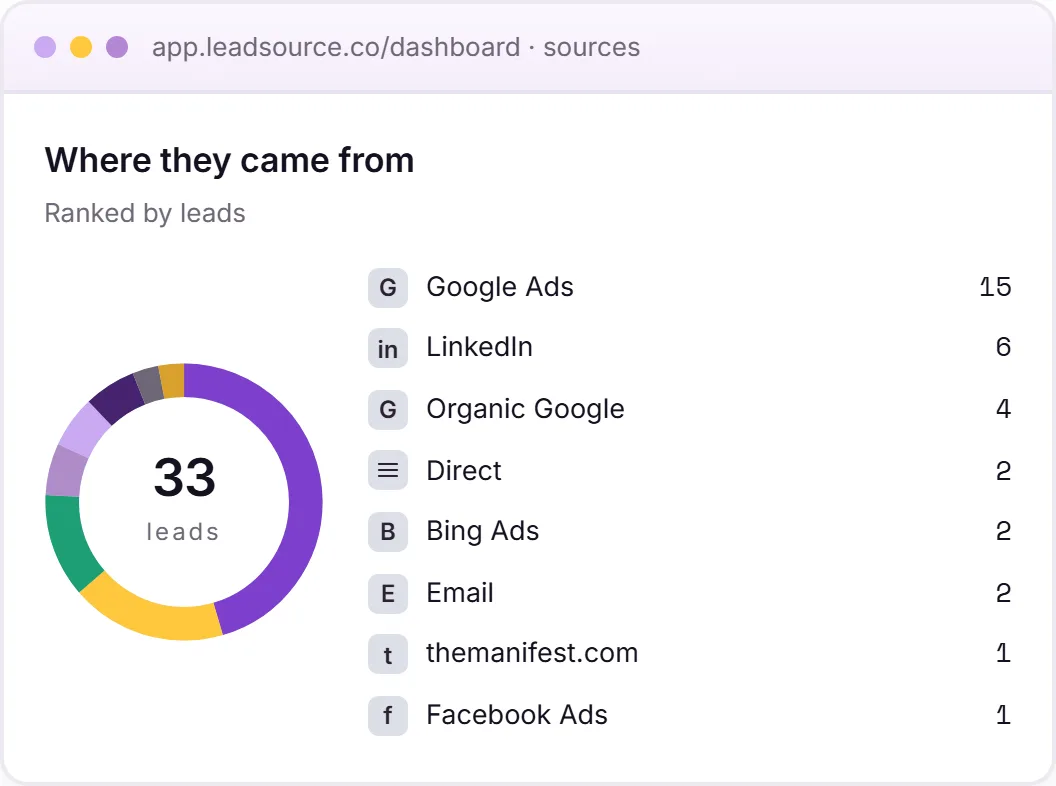
Every Wix form lead, ranked by the channel that actually produced it. Which campaigns pay, which don't, and the full journey behind each enquiry.
- A ranked source breakdown across every channel
- The landing page and full page journey on each lead
- One view, independent of your CRM
Works with every Wix form type
Wix forms collect the data. Source isn’t part of it.
Wix Forms are designed for non-developer site owners. Drag, drop, configure, done. Submissions land in the dashboard and trigger Wix Automations. Native source capture isn’t part of the picture; Wix expects you to enable Velo (their developer mode) if you want to wire it up yourself.
The forms and the automation
- Wix Forms (built-in) and Wix Forms App
- Submissions in the Wix dashboard
- Wix Automations triggered by submission
- Native integrations (Mailchimp, ActiveCampaign, etc.)
- Custom Code panel for tracking scripts
Source attribution
- No hidden field UI in Wix Forms
- No URL parameter prefill (without Velo)
- No source data in dashboard or notifications
- Velo (dev mode) required for custom logic
- No cross-page UTM persistence
Enable Velo. Write code. Manage collections.
The Wix-recommended path to lead source attribution involves enabling Velo (Wix’s developer mode), writing backend code to handle form submissions, creating a Wix data collection to store source values, and managing the schema yourself. It’s a developer project on a platform most people use to avoid developer projects.
The manual way
- 01Enable Velo (Wix’s developer mode) on your site. This enables code editing but also adds complexity and can affect site performance.
- 02Write Velo backend code (Wix’s server-side JavaScript) to handle form submission events. Parse URL parameters from the page that referred to the form.
- 03Create a Wix data collection to store source data linked to submissions. Manage the schema, permissions, and indexing yourself.
- 04Test across desktop and mobile, across all your forms, and across browser sessions. Maintain it as Wix updates Velo’s APIs.
With Lead Source
- Add the app from the Wix App Market. No Velo, no developer mode, nothing pasted anywhere.
- We detect every Wix Forms submission on the site automatically. Built-in and Wix Forms App.
- Source captured at submission with cross-page UTM persistence. Written out: “Google Ads · Local Services Sydney”.
- Your Wix Forms stay exactly as you designed them. No Velo collections to manage, no backend code to maintain.
// you picked Wix to avoid writing code. we noticed.
Wix lead source tracking, from one install.
Every form on the site, tracked from the moment the app is added. Nothing per form, nothing to maintain, and nothing that breaks the next time you edit a page.
- Installs from the Wix App Market, no code editing
- Covers every form on the site, including ones you add later
- Survives an editor rebuild, because it is not attached to any single form
- The same tracking works on non-Wix sites too, if you run more than one
The official Wix app.
Add it from the App Market and it starts working immediately. No script to paste, no Custom Code panel, and no changes to the forms you have already built, and we wrote up the app launch when it shipped.
- One click from inside your Wix dashboard
- Nothing pasted anywhere
- Every form on the site, including ones you add later
- Free to install
View it in the Wix App Market
<!-- Paste your real snippet from app.leadsource.co -->
<script async src="https://app.leadsource.co/ft.js" data-site="YOUR_SITE_KEY"></script>
The real snippet is generated for your account when you sign up. Copy it from the install page in your dashboard. Under 50ms execution. Async, so it doesn’t block your page. No dependencies.
Or paste it yourself.
Sign up, copy the snippet from your dashboard, and paste it into Wix’s Custom Code panel. Same capture, same dashboard.
Sign up to get your snippet →Two clicks in the App Market. That is the install.
Add it from the App Market
Open the Wix App Market from your dashboard, search for Lead Source, and click Add to Site.
Fill in your own form
Go do it yourself, right now. It arrives named, with the source, in seconds.
?utm_source=test to the URL before you submit.That is it
Every form on the site is tracked. Including the ones you have not built yet.
Prefer to paste it yourself?
In your Wix dashboard, go to Settings → Marketing & SEO → Custom Code → Add Custom Code. Paste the snippet, set placement to Head, set pages to All pages, set load code on each page to Load once. Save.
Custom Code needs a published site with a connected domain, which is a paid Wix feature. The app has no such requirement.
Questions, answered.
Do I need to enable Velo or Wix Studio?
No. Install the app from the Wix App Market and it works on any Wix site, Studio or not. No developer mode, no backend code, no data collections.
Does it work with Wix Forms App?
Yes. Wix has multiple form options. The built-in Wix Forms element and the more advanced Wix Forms App. Lead Source detects both via the standard form submission event. Forms created in either path are captured automatically.
Will it conflict with Wix Automations?
No. Lead Source observes the form submission in parallel. Your Wix Automations (email follow-ups, Mailchimp sync, Wix Inbox notifications) keep firing exactly as configured.
Do I need a premium Wix plan?
Not for the app. It is free in the Wix App Market. The script route is different: Wix's Custom Code panel needs a published site with a connected domain, and connecting a domain is a paid Wix feature.
What about Wix Lightbox popup forms?
Yes. Lightbox forms emit the same submission event as inline forms. The popup context doesn't affect detection.
Track your Wix leads. Free to start.
One script in Wix's Custom Code panel. Every Wix Form. Source, campaign, page journey without enabling Velo or writing a line of backend code.
Start freeFree to start · no card