Conversion tracking that names the lead, not just the event
Know which campaign, channel and page brought every conversion, and who the person was. Then back what works, spend more where it pays, and make more from the same budget.
Free to start · no card


Every conversion, with the campaign behind it
A form submitted, a number called, a thank-you page reached: each one arrives as a named lead with the channel and campaign that brought it.
- See which campaigns bring leads, and put the budget behind them.
- Pick conversion tracking tools that keep the person, so every conversion can be followed to a customer.
- New to the idea? What conversion tracking is has the definition in plain English.
- Person
- Named
- Channel
- The real source
- Campaign
- Recorded
Conversion tracking, plus the lead behind it
Keep both. Lead Source adds the name, the channel and the campaign to every conversion you already count.
| Conversion tracking | Lead Source | |
|---|---|---|
| What it records | Counts the event | Names the person |
| Level of detail | Session or click level | Lead record level |
| Where it came from | Channel, within each platform | Channel, campaign and full page journey |
| Touchpoints | First touch or last touch, by platform | First touch and last touch, both recorded |
| Where the number lives | A count in each platform | One record on the lead, in your CRM |
| What you learn | How many | Who, and from where |
Back the channels that bring customers
See which channels and campaigns bring your named leads, then put more budget behind the ones that work.
- Compare channels by the leads they bring, side by side.
- Spend more where the leads come from and make more from the same budget.
- The source and the campaign sit on the lead record itself, inside the CRM you already use, so there is no reporting project to run.
Every conversion, as a lead record
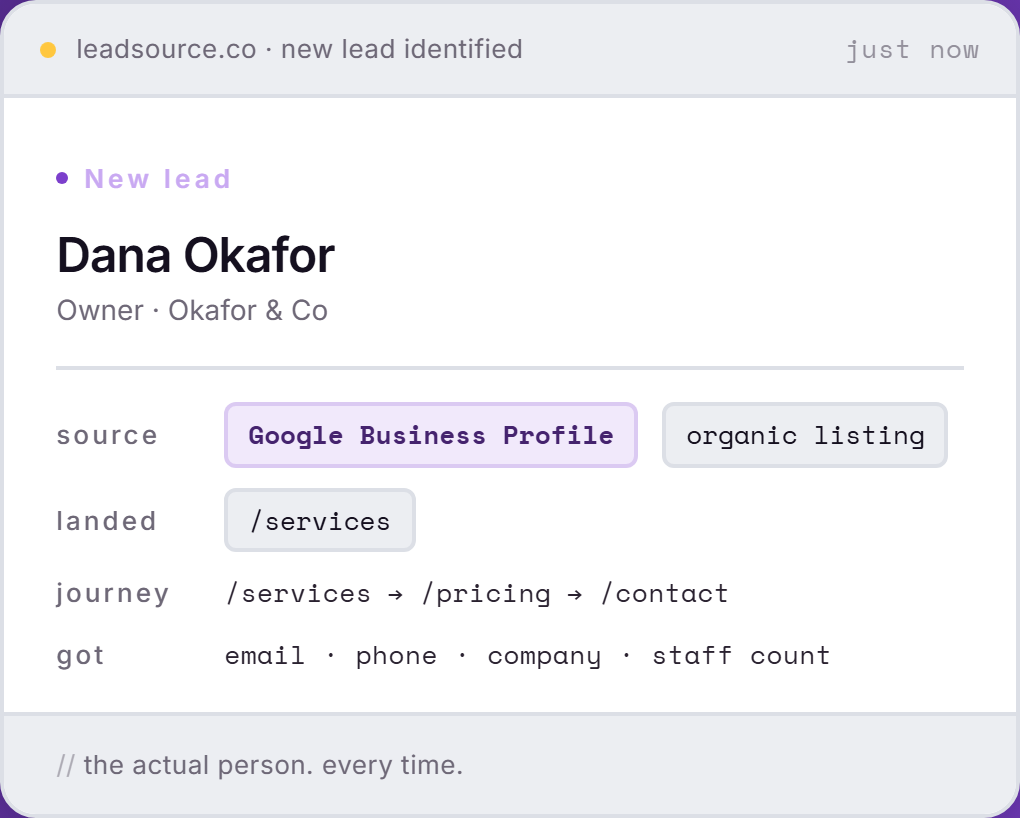
One conversion in Lead Source is a named person, the source that brought them in, the page they landed on and the pages they read on the way to the form.
- One lead, one record.
- Each record also carries the campaign behind the click, so two leads from the same channel can be told apart.
Which campaign and which page won the conversion
Lead Source captures the source channel, the campaign, the landing page, the form page and the full page journey behind every form submission, along with every field the visitor submitted.
- It records first touch and last touch, so you see what introduced the lead and what closed the gap to the form. Fund the first, back the second.
- See which pages bring the leads, then write more like them.
- When the form captures a name, the record carries it. Each lead also gets an intent score of high, medium or low, so you can see which enquiry deserves a call first.
- Read how the channels are named on Lead Source Tracking, or see what a paid-search click turns into on Google Ads attribution.
- First touch
- Google Business Profile
- Last touch
- Direct
- Intent
- High
Keep your conversion tags. Add the lead behind them.
Your tags keep feeding the ad platform. Lead Source adds who the person was and which channel sent them.
Submitted, recorded, named on the lead.
Every conversion that comes through a form ends up as a lead record, with the source already on it.
A visitor submits your form
Any form on any page. The submission is the conversion, and nothing is set up per form.
The source is recorded with it
Channel, campaign, landing page and page journey, first touch and last touch.
The lead goes where your leads go
The record arrives named, with the source on it, in the CRM you already use.
What to look for in conversion tracking tools
Most conversion tracking tools are good at one thing, which is counting. The differences that matter show up when you ask what the tool keeps after it has counted. Five questions separate the options:
- Does it record a person or only an event? An event count tells you volume. A named lead tells you who to call, and which of your customers started where.
- Does it keep both touches? The first touch shows what introduced the lead. The last touch shows what finished the job. A tool that keeps only one hides half the route.
- Does it name the campaign and the landing page, or only the channel? Knowing a lead came from paid search is a start. Knowing which campaign and which page is the part you can act on.
- Where does the answer live? A figure inside one platform's dashboard cannot be compared with another platform's. A source on the lead record can be compared across all of them, in the system your team already opens.
- Does it work when there is no tag to read? Organic search, direct traffic and referrals arrive with no UTM on them, and on most sites that is the larger share. A tool that only reads what you tagged will miss the leads you did not pay for.
Lead Source answers each of these on the lead record: the source channel, campaign, landing page, form page and full page journey, first touch and last touch, the name when the form captures one, and an intent score of high, medium or low. Your existing conversion tags stay exactly where they are.
Works with the tools you already run
Lead Source sits next to your forms and your tags, and sends the source on to wherever your leads go. Browse the full list on the integrations page.
You run Google Ads.
Keep the conversion tag. Google Ads still needs it to bid. Lead Source adds who the lead was and which touches brought them. See Google Ads attribution.
You have a CRM.
Leads reach HubSpot, Salesforce or whatever you run through the Lead Source Zapier app, a signed webhook or a CSV export, with the source on the record.
You only have forms.
That works too. With no CRM, every lead sits named in the Lead Source dashboard, with its source and journey attached.
Conversion tracking questions, answered.
What is conversion tracking software?
Conversion tracking software records when a visitor completes an action you care about, such as submitting a form or calling you, and counts it against the campaign that sent them. The plain definition is in What is conversion tracking?
Is conversion tracking the same as lead tracking?
No. Conversion tracking records that an event happened. Lead tracking records who the person was and where they came from. See what a lead source is.
Why don't my Google Ads and GA4 numbers match?
They count with different rules, so the totals rarely agree. The causes, and which number to trust for which decision, are in GA4 conversion tracking: what key events actually tell you.
Can I track conversions that happen on the phone or in my CRM?
Yes. Google Ads accepts offline conversions, such as a phone enquiry that closes in your CRM, sent back against the original click. How that works today is in offline conversion tracking.
Do I still need Google Ads conversion tracking if I use Lead Source?
Yes. They do different jobs. Google Ads needs conversion signals to bid. Lead Source tells you who the lead was and where they came from.
Count the conversion. Keep the lead.
Lead Source names the person and the channel behind every form submission. Free to start.
Start freeFree to start · no card