
A lead source is the channel, ad or referring page that first brought a prospect to your business. Online sources include organic and paid search, email, social, referral links and affiliates; offline ones include word of mouth, events, outreach and direct mail. The category alone is not enough: the specific source is what tells you which campaign to fund.

Why lead source data matters
Conversion tracking tells you an event happened. A lead source tells you who it was and where they came from.
Marketing teams spend money on a hundred different things: paid search, paid social, content, conferences, sponsorships, partnerships, agency retainers. Each one is supposed to drive enquiries. Without accurate lead source data, there is no honest way to say which one actually did.
The lead source is the bridge between marketing spend and sales outcomes.
It tells you which source drove the form fill that became the opportunity that became the customer. Without it, attribution falls back on whichever channel last touched the visitor. Often that is Direct: someone reads about you somewhere, thinks about it for a few days, then types your URL into a browser. That visit gets recorded as Direct. The original source is lost.
Accurate lead source data answers three practical questions: which sources are sending real enquiries (not just clicks), where the highest-value enquiries come from, and which channels deserve more budget versus less. Without it, those decisions get made on gut feel or on metrics that don’t correlate with revenue.
Common categories of lead sources

Most attribution systems use a handful of top-level categories. The names vary across tools but the meaning is consistent:
The visitor found you via an unpaid search result (Google, Bing).
The visitor clicked a paid search ad (Google Ads, Microsoft Ads, Bing Ads).
The visitor typed your URL or used a bookmark, with no referrer detected.
The visitor followed a link from another website (a blog mention, a directory, a partner page).
The visitor clicked a link in an email (newsletter, marketing, transactional).
The visitor followed a link from a social network (LinkedIn, Facebook, X, Reddit, YouTube).
The visitor clicked a paid ad on a social network (LinkedIn Ads, Meta Ads).
The visitor came via a tracked partner link, usually with a unique partner code in the URL.
Podcast mentions, conferences, offline marketing, or anything else that doesn’t fit the above.
Useful lead source data goes deeper than the category. Within "Paid search," you want to know the specific source (e.g. "Local Services Sydney"). Within "Social," you want to know the post or video that drove the click. The category alone isn’t enough to make a budget decision.
Offline lead sources
Not every lead starts with a click. Offline sources matter just as much, and they are the ones most likely to end up filed as Direct because nothing in the browser records them.
A customer or contact recommends you. Easy to overlook, because nothing in the browser records it.
A conversation at a stand or a talk. The lead arrives at your site days later by typing your URL.
You contacted them first, by phone or email. The source is your own list, not a channel they found.
A billboard, a van, a local ad. Invisible to analytics unless you use a dedicated URL or ask.
| Lead source | What it means | Example |
|---|---|---|
| Organic search | Unpaid search result | Google search for “lead tracking software” |
| Paid search | Paid search ad click | Google Ads campaign “Local Services Sydney” |
| Direct | Typed URL or bookmark, no referrer | Returning visitor typing leadsource.co |
| Referral | Link from another website | A directory or partner page |
| Link in an email | Newsletter link click | |
| Social | Organic social link | A LinkedIn post |
| Paid social | Paid social ad | LinkedIn Ads, Meta Ads |
| Affiliate or partner | Tracked partner link | URL with a unique partner code |
| Word-of-mouth referral | A person recommended you | Customer mentions you to a peer |
| Events | Met at an event or trade show | Conference conversation |
| Cold outreach | You contacted them first | Outbound email or call |
| Print, radio, signage | Traditional advertising | Billboard with your URL |
Lead source vs campaign source
The two terms get used interchangeably, but they answer different questions. The lead source is where the lead came from: Google Ads, a LinkedIn post, a referral. The campaign source is which specific campaign inside that channel did the work: not “paid search” but “Local Services Sydney”. In UTM terms, utm_source carries the source and utm_campaign carries the campaign, and a budget decision needs both. A report that stops at the channel level tells you paid search works; only the campaign source tells you which campaign to fund and which to kill.
Lead source examples
Three illustrative examples, from most to least visible:
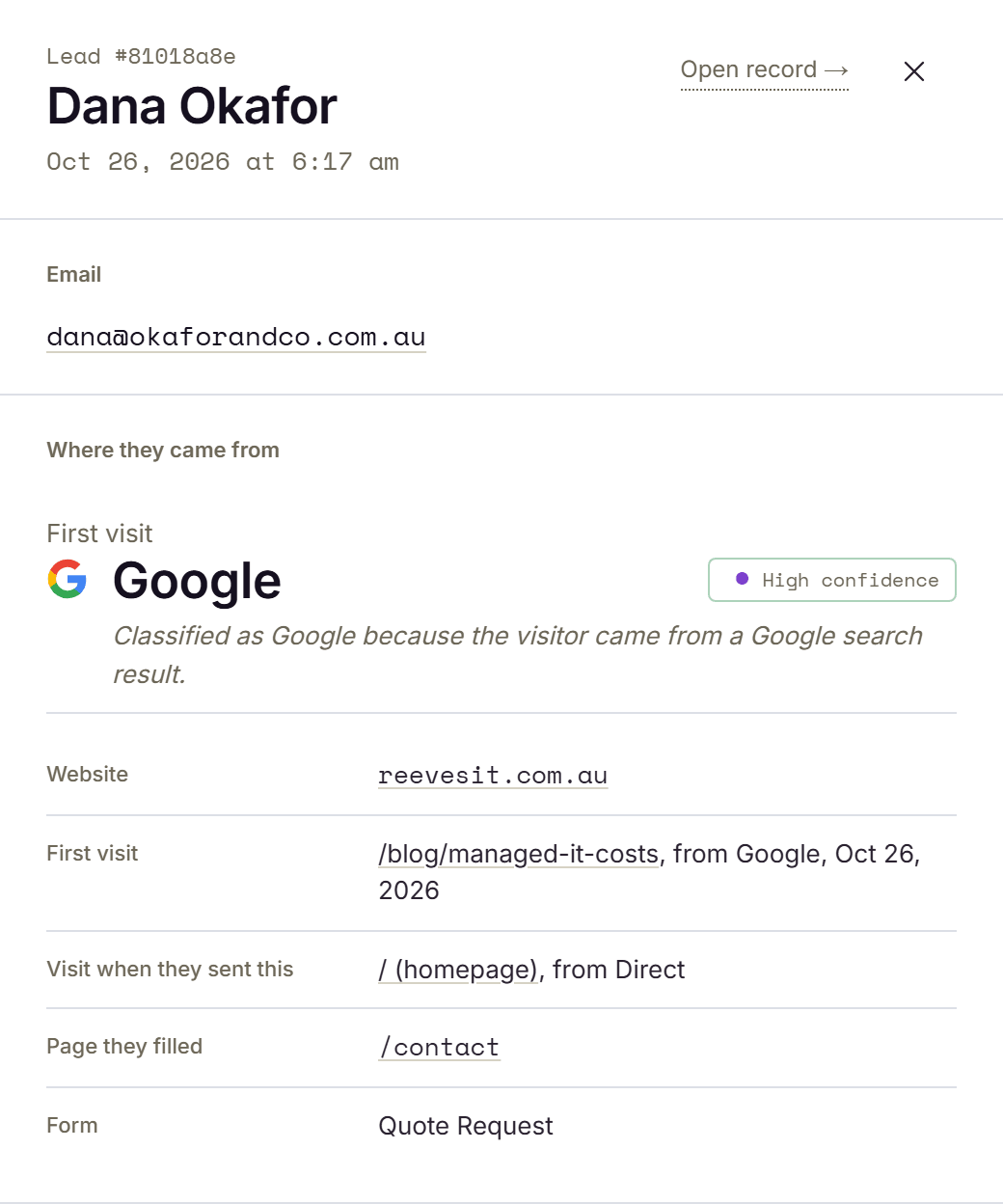
A paid search lead. Dana Okafor searches “managed IT sydney”, clicks a Google Ads result, reads two pages, and fills in the contact form. The lead source is the specific campaign, “Local Services Sydney”, because that is the level a budget decision gets made at. “Google” and “paid search” are too broad to act on.
An organic social lead. Someone sees a LinkedIn post on Tuesday, thinks about it, and comes back Friday by typing the URL. The real source is the LinkedIn post. Analytics will usually call it Direct, because the Friday visit has no referrer and the Tuesday one never converted.
A referral lead. A current customer mentions you at a barbecue. The lead lands on your site with no referrer, no UTM, nothing. The only way this source ever gets recorded is if someone asks “how did you hear about us?” and writes down the answer.
Where lead source data comes from
Lead source data is derived from a small set of signals the browser sends when a visitor arrives at your site:
The URL the visitor was on immediately before landing on your page. This is the most direct signal but it can be missing: private messaging apps often pass none, and links marked with rel="noreferrer" hide it entirely.
Query string values (utm_source, utm_medium, utm_campaign) that the marketer adds to outbound links. UTMs are precise when present but fragile: they exist only on the landing page URL and disappear the moment the visitor clicks to a different page.
Ad-network-specific parameters like gclid (Google), fbclid (Meta), li_fat_id (LinkedIn). These let you tie back to the ad platform’s own reporting.
The first page they landed on. Even without UTM or referrer, the entry page tells you something (a landing page typically maps to a specific source).
The path the visitor took through your site before submitting. This gives context that a single source field can’t.
The hard part is not capturing these signals on the first page view. The hard part is keeping them attached to the visitor across the full session. Across page navigations, across tabs, sometimes across days. So that when the form is submitted three pages and two visits later, the original source is still attached.
See your own, not an example
This page defines the term. Lead Source shows you the real value behind every enquiry you get.
How CRMs record lead source, and why it’s often wrong

Most CRMs have a lead source field, but they fill it in very differently, and none of them reliably capture the real marketing source of a web lead on their own.
| CRM | What its field records | Where it falls down |
|---|---|---|
| HubSpot | Original traffic source (first known web source) and Latest traffic source (most recent known web source) | Values are set from what HubSpot’s tracking sees, and ad blockers can block its cookies, so some visits go unrecorded |
| Salesforce | Manual picklist, no automatic web detection | Blank on web forms unless a developer hard-codes a value |
| Pipedrive | How the lead entered (web form, chatbot, import) | Google Ads and organic both show as “Web forms” |
HubSpot keeps two properties, defined on its own traffic source page: Original traffic source, the first known web source through which a contact interacted with your business, and Latest traffic source, the most recent known web source. HubSpot sets them automatically from contact interactions, and notes that ad blockers can block its tracking cookies and affect the values. What each property records, and what it leaves out, is covered on HubSpot lead source tracking.
Salesforce treats its field as a manual picklist your admin defines, with no automatic web detection: no cookies, no UTM parsing, no referrer analysis. On web forms it stays blank unless a developer hard-codes a hidden value, so in practice it is often empty or set to one generic bucket for every online lead. The detail sits on Salesforce lead source tracking.
Pipedrive records how a lead entered (web form, chatbot, import, API) rather than the marketing channel. A lead from Google Ads and a lead from organic search both show up as “Web forms.” The actual source has to be captured separately and passed in. The same pattern holds in smaller CRMs; see how the field behaves in Keap.
The pattern is the same across all three: they record a category or an entry method, and when they cannot see where a visitor really came from, they fall back to Direct, Web, or blank.
Why CRM lead source fields are often wrong
In theory, the field gets populated automatically. In practice, it is often wrong or empty. Three common reasons:
The referrer was stripped
A visitor clicks a link in a private messaging app. The app passes no referrer with the click. By the time the visitor lands on your site, the browser has no record of where they came from. The CRM marks the lead as Direct.
UTM parameters were lost mid-journey
A visitor arrives via ?utm_source=google&utm_campaign=brand, lands on the homepage, browses to /pricing, then submits a form. The CRM’s tracking script reads the URL at the moment of submission. Which is /pricing, with no UTM parameters. Source: Direct.
The journey crossed sessions
A visitor reads about you on Tuesday via a LinkedIn post, comes back Friday by typing the URL, and submits the form. Many CRM trackers see the Friday session in isolation: typed URL, no referrer, source is Direct. The original LinkedIn touch is lost.
How much actually gets mislabelled? In an April 2023 experiment, SparkToro recorded 1,113 visits over 10 days to test pages shared across eleven social networks and five private messaging systems, so the true source was known. 100% of visits from TikTok, Slack, Discord, Mastodon and WhatsApp were marked “direct” with no other referral information, and 75% of visits from Facebook Messenger carried no referral information (SparkToro, 2023). Your CRM inherits the same blind spot: anything it cannot see, it files under Direct or Web.
These are common ways a source goes missing. A useful lead source capture system has to handle all three.
Lead source vs HubSpot Original Source
HubSpot’s Original Source is its version of a lead source field, set to one of seven values (Direct Traffic, Organic Search, Paid Search, Email Marketing, Organic Social, Referrals, Other Campaigns) plus drill-downs. It is right when it can be: it captures the high-level category for many leads and provides a starting point for attribution. But it suffers from the same fundamental problem as every CRM-native field: it depends on the browser session being seen end-to-end by HubSpot’s tracking script, on referrer headers surviving, on UTM parameters being present at submission, and on the visitor not crossing devices. When those conditions fail (which is often), the source becomes Direct, Other, or empty. Tools that specialise in lead source tracking fill that gap, capturing the source independently and passing it on through Zapier, signed webhooks or CSV export. See how this works specifically for HubSpot.
How to track lead source accurately

Accurate lead source tracking has three requirements:
1. Capture on first touch. Record the source at the moment the visitor first arrives on your site. Including referrer, UTM parameters, click identifiers, and entry page. Don’t wait for them to submit; by then it’s often gone.
2. Persist across the session. Store the captured source somewhere it survives page navigation (typically a first-party cookie or sessionStorage). When the visitor browses from the landing page to the pricing page to the contact form, the original source rides along.
3. Attach at submission. When the form is submitted, attach the persisted source data to the submission. Either by pushing it through hidden form fields or by sending it to a webhook in parallel with the form action.
This is the model used by dedicated lead source tracking tools. It’s a different problem from web analytics (which typically samples a visitor population) and from CRM-native source tracking (which usually inspects the URL at submit time and misses the journey).
To turn these categories into a picklist for your CRM, use the lead source taxonomy builder. Keeping that list clean once it is live is lead source management.
See what each channel costs you

Once you know the real source of every lead, you can work out what each channel actually costs. Enter your spend and leads to see your cost per lead, cheapest first.
| Channel | Monthly spend | Leads | Cost per lead |
|---|
Compare lead source and attribution tools
Weighing up options? These breakdowns cover what each tool costs and who it fits:
- Lead Source vs HockeyStack · HockeyStack pricing
- Dreamdata alternative · Dreamdata pricing
- Lead Source vs WhatConverts · WhatConverts pricing
- Fixing HubSpot’s lead source field
- Tracking lead source in Salesforce · Google Ads attribution
- CRM lead source tracking · lead source examples · source vs channel · compare how each CRM stores it
- Lead Source vs Leadfeeder
Or see what each channel really costs you: try the cost-per-lead calculator →
The rest of our attribution guides are on the Lead Source blog.